Skip to content

Skills Passport is a getTWOit product.

Visit getTWOit.com

getTWOit Skills Passport

Show the skills behind what you’ve done.

Think of something you’re proud of. Ask someone who saw you do it to recognise the skills you used. Share their credential on your CV or LinkedIn, or give someone else credit for work you’ve seen first-hand.

Get the free app

Collect unlimited credentials for free. Issue up to five a month on the free plan.

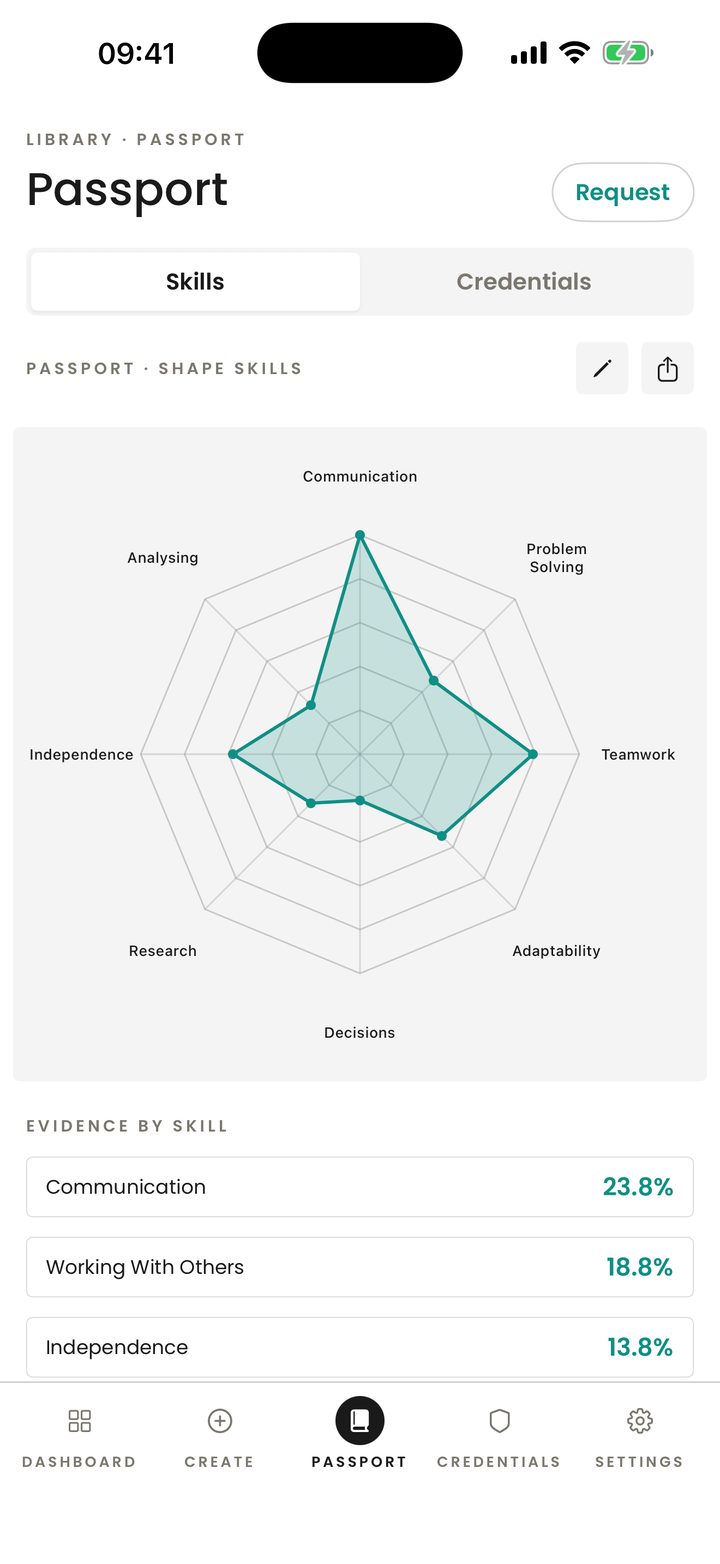
The Passport screen: a skills radar across the eight SHAPE skills

What does “peer mentor” mean on a CV?

Example credential
Verified institution

Peer Mentor Certificate

Issued by Wrenhaven College · 4 Nov 2026

Description

Awarded for mentoring first-year students through their first term, with weekly one-to-one sessions.

Criteria

  • Completed the college’s mentor training
  • Ran at least ten one-to-one sessions
  • Kept a reflective log, reviewed by staff

Sample Passport

CommunicationProblem SolvingTeamworkAdaptabilityDecisionsResearchIndependenceAnalysing
Your Passport shows which SHAPE skills people have recognised in your work. Use it to decide what to develop next.

Which skills show up in your work?

In geography, you might weigh conflicting accounts of why a town floods. In physics, you might explain an unexpected result to a lab partner. At work, those same skills help you judge evidence, communicate uncertainty and make decisions with others.

Your Passport uses eight skills identified by the British Academy through the social sciences, humanities and arts (SHAPE). You can demonstrate them in any field, through study, work or volunteering.

Explore the eight SHAPE skills
Communication
Explain a complex finding so someone can act on it.
Problem Solving
Work out why a service keeps failing and test a fix.
Working With Others
Help colleagues with different priorities agree on a way forward.
Adaptability & Creativity
Find another way to reach people when the original approach falls short.
Decision Making
Weigh competing options and explain why you chose one.
Designing Research & Collecting Evidence
Frame a question and decide whose experience you need to hear.
Independence
Spot a piece of work that needs doing and take responsibility for it.
Analysing
Compare sources and identify which conclusions the evidence supports.

Read the British Academy’s SHAPE Skills at Work

In the World Economic Forum’s 2025 global employer survey, seven in ten companies identified analytical thinking as essential. Future of Jobs Report 2025

How the Skills Passport works

Claim a credential for anything you’ve done

  1. Ask for recognition

    Think of something you’ve done: a project at work, a course you completed years ago, or a community event you helped organise. Describe your contribution and ask the person or organisation involved to recognise it.

    See what to ask

    Hi Jo, would you recognise the work I did on our community fundraiser with a Skills Passport credential? I organised the volunteers and revised the rota when plans changed. I’d like to show that experience when I apply for team leader roles.

Steps 2 and 3
  1. Collect your credential

    Once they issue it, add it to your Passport. If you already have an invitation, you can collect it straight away by email, claim link or QR code.

  2. Choose what to share

    Send one relevant credential with an application or share your whole Passport for a development conversation.

Give someone a credential

  1. Describe the achievement

    Say what the person did and what they had to do to earn the credential.

    Example of what to write

    When our delivery schedule changed, Sam spoke to the customers affected and helped the team agree a new plan.

    Communication · Working With Others · Problem Solving

Steps 2 and 3
  1. Choose the skills

    Select the SHAPE skills the achievement called for and indicate which featured most strongly.

  2. Send the credential

    Email it to one person or use a claim link or QR code for a group.

Collect unlimited credentials for free. Issue up to five a month on the free plan.

See how recognition works

Watch Amara issue a credential and see how Jordan collects and shares it.

42 seconds · No sound · AI drafting is available on the Professional and Creator plans.

Transcript

Video, 42 seconds, no sound. Amara picks a design on her iPhone, types one sentence about what Jordan did, and AI drafts the micro-credential with the skills it shows. She sends it to Jordan by email. On Android, Jordan accepts it and their Passport updates to include the credential. They share their Passport on LinkedIn, WhatsApp, by link or by QR code.

For organisations

Give people a record of what they achieved on your programme.

Issue credentials in your organisation’s name. Each one describes the achievement, the criteria for earning it and the skills involved. Participants can take that record into an interview or development review.

Use a shared template to recognise a whole cohort. Anyone you share a credential with can check the issuer and issue date.

The British AcademyWellcome

In 2026, the British Academy’s Early Career Researcher Network reported more than 16,000 getTWOit micro-credentials issued and a 99% collection rate.

The Network maps credentials to the British Academy’s SHAPE Skills at Work framework.

“This shared language helps individuals articulate their capabilities and identify their next development goals.”

Urszula Pawlicka-Deger, Wellcome, and Alex Lewis, British Academy, writing in reSHAPE 2026, p. 16.

We can map the skills across your programmes.

We also work with organisations to identify the skills their programmes develop: past programmes, current ones and those still being planned. You issue credentials based on those skills, and build skills literacy across your organisation.

Our full data service then shows the wider picture: skills mapped by region and by interest, and the potential for development, in line with government agendas and priorities.

Talk to us about your programme

Education Technology Insights named getTWOit its “Top Micro-Credentials Skills Recognition Platform in UK” for 2026/2027.

Some of the organisations using getTWOit micro-credentials

Organisations using getTWOit: Aspect, LSE Summer School, British Council, University of Oxford, Durham University, Queen’s University Belfast, University of York and Liverpool John Moores University

Features

Everything a credential needs, from first draft to LinkedIn.

getTWOitLinkedIn

Every credential can be added to your LinkedIn profile in a couple of taps. It sits under Licences & certifications, with a link to its verification page.

Creating credentials
Create in minutes
Choose a design, type or speak the achievement, and weight the skills. Five a month on the free plan.
AI drafting Professional & Creator
Describe what the person did. AI drafts the wording for you to review.
AI badge art Professional & Creator
Design your own badge artwork with AI. The app asks before anything is sent, and checks images before they show.
A shared library Organisations
Your designs and credentials, ready to send as they are and counted against your plan, not an admin's.
Issuing credentials
Issue as your organisation Organisations
Your name and your own Open Badges issuer on every credential, sent by your admins from the app or the website.
Send at scale Organisations
One person by email, a whole cohort from a spreadsheet, or anyone you choose with a QR code or claim link.
Request recognition
Ask any organisation for a credential for training, an internship, mentoring or other work you've completed.
Managing credentials
Collect in a tap
Accept from an email or scan a QR code. Collecting is unlimited on every plan.
Skills radar
See which skills have been recognised across your credentials.
Share anywhere
Add to LinkedIn, send on WhatsApp, or share a link or QR code for one credential or your whole Passport.
On every device
iPhone, iPad, Android and the web, with the same Passport everywhere.
Control who joins Organisations
An optional waiting list you approve or decline. People who already hold one of your credentials join straight away.
A home for your members Organisations
Your community on getTWOit, where members keep their Passport and your credentials side by side.
Know it's real
The Open Badges standard, a public verification page for each credential, revocation, and issuers who can verify their identity. How verification works
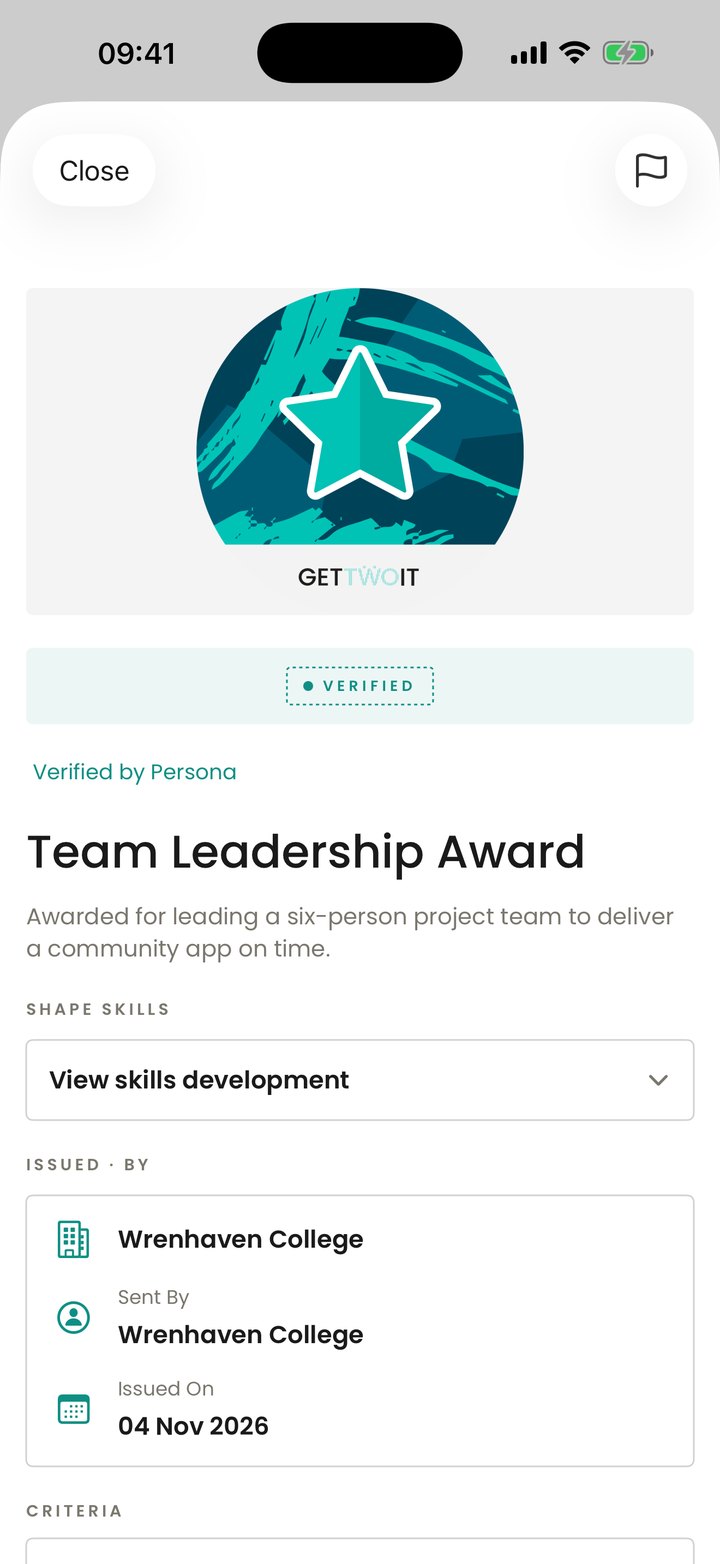
A credential's detail: issued by Wrenhaven College, verified, with the date and skills

Trust and verification

Credentials anyone can check.

Employers and admissions teams want to know a credential is real. Every Skills Passport credential shows who issued it, when, and whether it still stands.

How verification works
  • A public verification page

    Each credential has its own page showing who issued it, when, the skills it covers, and whether it is still valid or has been revoked.

  • Open Badges standard

    Credentials follow the open standard used across education, so other systems can read them.

  • Optional identity checks for issuers

    Issuers can choose to verify their identity through Persona's automated checks. These confirm the issuer's identity, not the achievement itself.

  • Revocation and reporting

    An issuer can withdraw a credential, and anyone can report one that's wrong or block an unwanted sender.

FAQ

Questions people ask first.

Is Skills Passport free?

Yes. Collecting credentials is free and unlimited on every plan, and the free plan lets you issue 5 credentials a month. Professional and Creator add more issuing and the AI tools.

Do I need the app to receive a credential?

You get an email with a link. To keep the credential in your Passport, accept it in the app on iPhone or Android, or on the web at app.gettwoit.com.

What is a micro-credential?

A digital record of something specific you achieved or learned: who issued it, when, what it was for and the skills it shows. Skills Passport credentials follow the Open Badges standard.

Do employers value micro-credentials?

In Coursera’s 2025 survey, 96% of employers surveyed said a micro-credential strengthens a candidate’s application. Coursera’s 2025 Micro-Credentials Impact Report

How can someone check a credential is real?

Every credential has a public verification page showing the issuer, the date and whether it has been revoked. Verified issuers have confirmed their identity through Persona.

Who can see my Passport?

You decide what to share: a single credential, your whole Passport, or nothing at all. You can report a credential that's wrong and block anyone you don't want to hear from. See the Privacy Policy.

How does my organisation get started?

Talk to us and we'll set up your community: your name on every credential, a shared library, and admins who can send by email, spreadsheet or QR code.

Powered by

Skills Passport is made by getTWOit, the platform organisations use to issue, manage and verify micro-credentials. Every credential issued on getTWOit can live in your Passport.

What would you put in your Passport first?

Start with a project you finished, someone you mentored or an event you helped organise. Or recognise the person who helped you do it.